GB WhatsApp Permissions – What Data Can It Access?
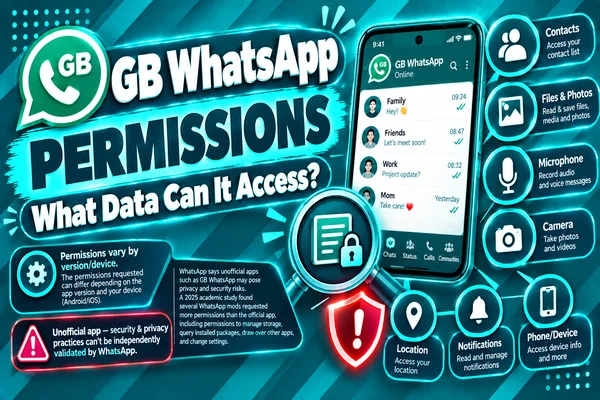
There are numerous features on GB WhatsApp which are not included in the official WhatsApp application, including Ghost Mode, Anti Delete messages, themes, etc. In order to use all these features, GB WhatsApp needs access to certain data in your Android smartphone. As any other messaging app does, GB WhatsApp requests permissions related to features like calling, messaging, contact information, and multimedia sharing.
However, GB WhatsApp is an unofficial app that is downloaded as an APK. Most users want to know about the permissions asked by the app and the reason. Understanding all these permissions will help you to grant or deny certain permissions accordingly.
Here is a guide for the most popular GB WhatsApp permissions, the reasons behind these permissions, which ones you should grant carefully, and how to review them.
Full Permissions List (table)
The following is the complete permission list that GB WhatsApp requires on Andriod devices. However, it depends on your Android version and features. Further, you may see all these permissions or some of them.
| Permission | Purpose | Required? |
| Contacts | Access saved contacts to display WhatsApp contacts and start chats | Yes |
| Camera | Capture photos and scan QR codes | Optional |
| Microphone | Record and send voice messages or make voice calls | Optional |
| Photos & Videos | Send, receive, and save media files | Yes |
| Files & Documents | Share PDFs, ZIP files, and other documents | Optional |
| Phone | Verify your phone number during registration | Yes |
| Notifications | Display incoming message alerts | Recommended |
| Location | Share live or current location with contacts | Optional |
| Contacts Sync | Keep your WhatsApp contact list updated | Recommended |
| Background Activity | Receive messages while the app is running in the background | Recommended |
| Nearby Devices (Android 12+) | Connect with nearby devices for supported features | Optional |
| Clipboard Access | Paste copied text, links, or media into chats | Optional |
Why Each Permission Is Requested
In addition to some essential permissions, there are some optional permissions for which GB WhatsApp requests permission, and they unlock extra features in the app. All these permissions are similar to those requested by any other messaging app, but they are used only when the related feature is used.
Notification Permission
By giving notification access, GB WhatsApp makes sure that you get notifications about the arrival of new messages, voice or video calls. Without this permission, the application is unable to show you message notifications till you open it.
Location Permission
Location permission is required only if you need to share your live location or current location with your contacts. If you have no plans to use this feature, you can feel free to deny this permission.
Files and Documents Permission
With this permission, you can send and receive files and documents like PDF documents, Word documents, ZIP archives, etc. Also, it allows the app to save all downloaded files on your device.
Background Activity Permission
To recieve messages instantly, GB WhatsApp requires access to background services. If you receive delays in notifications, message transmission, or missed calls because of Android blocking background processes, you can allow background processes to make it work better.
Nearby Devices Permission
For users who use Android 12 and later, there is a possibility of receiving a request for Nearby Devices permission. This permission allows you to use particular features of the device and connections without constant location access. It's not necessary to give this permission if you do not use them.
Permissions That Should Raise Concern
Most of the permissions asked by GB WhatsApp are common for a messaging application. Users should always be attentive when it requires any permission, checl them reason and why it is needed.
Permissions Not Related to Messaging
It is important to think carefully about a downloaded version that asks for permissions which are not associated with its features. If there is some unnecessary system access or device control required by the app. Users must ensure they review it before giving any access.
Excessive Permissions Asks
Of course, every legitimate messaging application requires access to contacts, media, camera, microphone, notifications, and phone verification. This means that if the APK asks for too many permissions immediately after installing it, users should consider downloading the latest version of the app from a trusted website.
Outdated APK Versions
If you download an older version of GB WhatsApp, its require broader storage permissions because it was designed for an older version of the Android system. Modern Android releases offer more detailed control over permissions and enable users to allow Photos, Videos, or Audio only instead of full Storage permission.
Check Your Permissions Periodically
Even after installing the app, it is recommended that you check permissions from time to time. You might be using some features less frequently, and you can simply remove permission to use those features.
How to Review/Revoke Permissions After Installation
It is simple to check and manage your permission settings on Android for GB WhatsApp.
1: Open App Settings
- Navigate to Settings > Apps > GB WhatsApp (menu title may differ depending on the type of your phone)
2: Check Permissions
- Here you will find all permissions that are granted/denied. On Android, permission requests are categorized by their function. There are several categories, including Camera, Contacts, Microphone, Photos and Videos, and Notifications.
3: Set Permission Access
Tap any permission to set:
- Allow always
- Allow while using the app (where possible)
- Ask always
- Deny
Select the option that relates to your actual use of the app.
4: Test Your App
- After setting permissions, launch GB WhatsApp and verify if your selected features are working fine. If any of them don't work anymore, Android will prompt you to request the necessary permissions to use that particular feature.
Reviewing your permissions, updating the app frequently, and downloading APK files from reliable sources can help you enhance your security when using GB WhatsApp.
Conclusion
Most of the permissions requested by GB WhatsApp are the same as the permissions required by official WhatsApp or other messengers. They are needed for chatting, calling, sending media messages, and receiving notifications. However, GB WhatsApp is not an official messenger; people must be particularly careful with permissions.
To stay safe, you must download the latest version from a trustworthy site, check permissions frequently, update your Android device, and make a copy of your chats before updating the messenger.